
On Friday afternoon, you receive an email from your employer: “Your direct deposit has been processed.”
You open your banking app. The money is not there.
You check on Saturday. Still not there.
It finally appears on Monday morning.
The money was “processed” on Friday. So where was it for the entire weekend?
The answer lies in the hidden infrastructure that moves the vast majority of domestic money. It is not a high-speed rail. It is a freight train.
In almost every country, the backbone of domestic business-to-business (B2B) and consumer-to-business (C2B) payments runs on a batch processing rail (known as ACH in the US, BACS in the UK, or BECS in Australia).
Moving money on this rail isn’t a single, continuous API action. It is a logistical operation of bundling files, calculating net positions in memory, and settling accounts through a central authority.
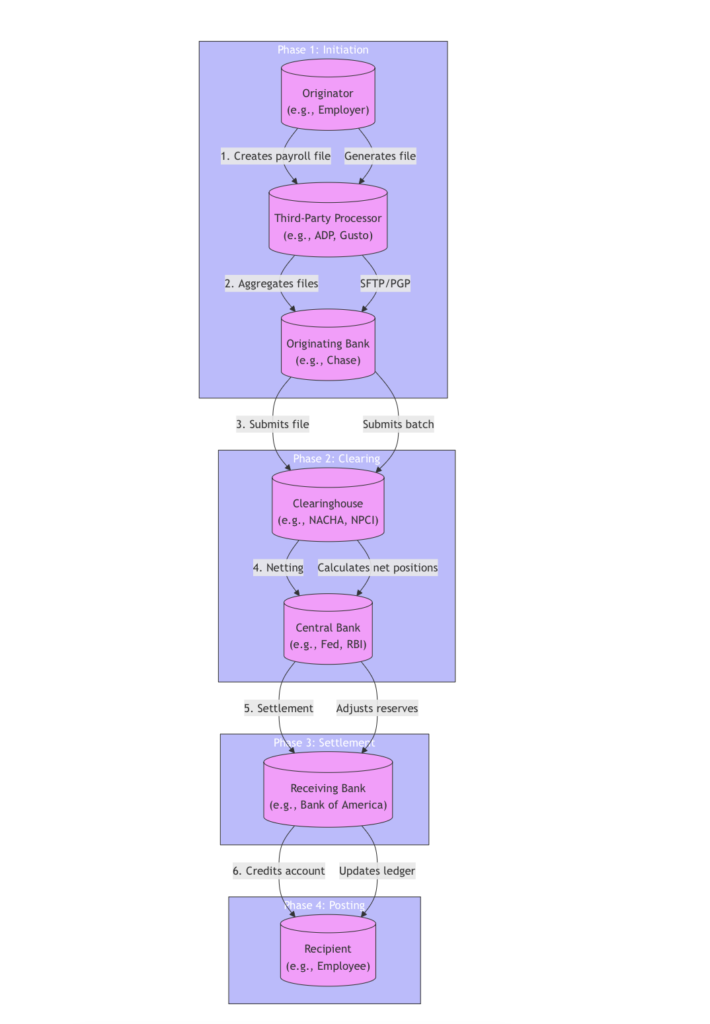
1. The Participants
Unlike a card network where a merchant and a bank communicate instantly via ISO 8583, a domestic batch rail involves a hub-and-spoke model with a central operator.
- The Originator: The person or business initiating the payment (e.g., your employer).
- The Third-Party Processor: Originators rarely build payment files themselves. They use processors like ADP or Gusto, which aggregate thousands of originators into a single, massive file to send to the bank.
- The Originating Bank: The financial institution that holds the Originator’s account, verifies funds, and transmits the file to the central network.
- The Clearinghouse Operator: The central, neutral utility that operates the network (e.g., NACHA in the US, Pay.UK). It does not hold consumer money; it acts as the central post office and calculator for all the banks.
- The Receiving Bank: The financial institution that holds the Recipient’s account, receives the sorted files, and credits the correct customers.
- The Central Bank: Commercial banks don’t settle with each other directly. They hold “reserve” accounts at the country’s Central Bank (like the Federal Reserve). The Central Bank is the ultimate accountant that actually moves the net value between the commercial banks.
- The Recipient: The person or business getting the money (e.g., you, the employee).
2. The Global Translation Guide
While the mechanics are universal, every major economy has its own specific name for this exact same freight train. The acronyms change, but the underlying lifecycle remains identical:
- United States (ACH): Operated by NACHA and settled through the Federal Reserve. Average speed: 1-3 business days.
- United Kingdom (BACS): Operated by Pay.UK and settled via the Bank of England. Average speed: Next-day or 3-day cycles.
- European Union (SEPA Credit Transfer): While Europe has launched instant SEPA, the bulk of recurring B2B and payroll still runs on standard, batch-processed SEPA rails. Average speed: 1-2 business days.
- Australia (BECS): Operated by Australian Payments Plus and settled via the Reserve Bank of Australia. Average speed: Next business day.
3. The Transaction Lifecycle
Regardless of the country, a transaction on a domestic batch rail follows a strict, four-phase lifecycle. It is designed to move massive volumes of money as cheaply as possible, sacrificing speed for raw compute and I/O efficiency.
3.1. Phase 1: Initiation (File Creation & Transport)
On Thursday, your employer’s HR department runs payroll. They do not send 500 individual API calls to their bank. Instead, their payroll software generates a single, strictly formatted flat file.
In the US, this is a NACHA file. It doesn’t use modern JSON or XML. It relies on rigid, fixed-width positional formatting—exactly 94 characters per row. If a name is 5 characters short, it must be padded with spaces so the routing number always starts precisely at character 42. This archaic format exists because it is perfectly compatible with 40-year-old mainframe parsers.
The Engineering Constraint: Generating these files in a modern JVM is an I/O and memory minefield. If a developer uses standard String.format() or concatenation to build a 100,000-row file, the JVM will create millions of transient String objects, triggering severe Garbage Collection pauses on the Young Generation. Production-grade batch generators:
- Pre-allocate
char[]arrays. - Strictly enforce single-byte ASCII encoding (preventing a multi-byte UTF-8 character from shifting the 94-character boundary and causing a bulk file rejection).
- Stream directly to a
BufferedWriter.
Once generated, the file is encrypted with PGP keys exchanged between the bank and the processor, and dropped into a secure SFTP directory. At this stage, no money has moved.
3.2. Phase 2: Clearing (The Batch Exchange and Netting)
This is where the “freight train” waits at the station. Domestic batch rails operate on strict cutoff times (e.g., 8:00 AM, 12:00 PM, 5:00 PM). If your employer’s bank misses the Friday afternoon cutoff, the file sits in an SFTP queue until the next window.
When the cutoff hits, the Originating Bank transmits its massive file to the Clearinghouse. The Clearinghouse receives files from thousands of banks simultaneously and performs Netting.
Example: Bank A owes Bank B $10 million for all the payrolls it sent out today. But Bank B also owes Bank A $8 million for auto-loan payments. Instead of moving $18 million, the clearinghouse calculates the net position: Bank A only needs to send $2 million to Bank B.
The Engineering Constraint: Netting millions of transactions cannot be done via a relational GROUP BY—the disk I/O would be catastrophic. Clearing engines use in-memory streaming frameworks (like Apache Flink, Kafka Streams, or highly optimized Java parallel streams). The files are parsed sequentially, and running BigDecimal tallies are maintained in memory. To avoid the severe CPU overhead of BigDecimal math during the aggregation, systems often:
- Scale values to primitive
longtypes (representing cents) for the intermediate calculations. - Only convert back to decimal formats for the final settlement instruction.
3.3. Phase 3: Settlement (Moving the Net Value)
Once the clearinghouse calculates the net positions, Settlement occurs.
The clearinghouse sends a single settlement instruction to the Central Bank. The Central Bank adjusts the reserve accounts (or settlement accounts) that commercial banks hold with it.
In our example, the Central Bank
- deducts $2 million from Bank A’s reserve account
- credits $2 million to Bank B’s reserve account.
The actual movement of fiat value happens here in a single bulk ledger entry, completely divorced from the individual 500 payroll transactions.
3.4. Phase 4: Posting (Crediting the Customer)
The settlement is complete between the banks, but the consumer still doesn’t have their money.
The Receiving Bank gets the sorted file from the clearinghouse. Now, its core banking system must execute thousands of individual ledger updates. This is where the batch rail collides with the core ledger architecture.
The Engineering Constraint: If a bank simply runs a massive UPDATE accounts SET balance = balance + X WHERE account_id = Y against a monolithic database, it will cause
- severe row-level lock contention
- B-Tree index latch contention, blocking any consumers trying to check their balance via the mobile app.
Legacy banks
- Run these sequential updates in a dedicated overnight batch window (as covered in the End-of-Day Batch Job).
Modern cloud banks
- Ingest the cleared file into a Kafka topic.
- Partition it by the
account_idhash. - Route the credits to dedicated Actor instances or virtual thread workers.
- This ensures that updates to a specific account are serialized in memory, completely bypassing database-level locks.
Once the bank’s compute layer finishes this bulk processing and updates your specific shadow ledger, the money finally appears in your app.
4. The Use Cases and Economics
If batch rails are so slow, why do they process trillions of dollars? The answer is cost.
Reconciliation Points in the Batch Rail Lifecycle
| Payment Rail | Speed | Cost | Use Cases |
|---|---|---|---|
| Real-Time (e.g., RTP) | Instant | 1.5% – 3% per transaction | Urgent payments, P2P transfers |
| Card Networks | Instant | 1.5% – 3% per transaction | Retail purchases, e-commerce |
| Batch Rails (ACH/BACS) | 1-3 business days | Pennies (or fractions) | Payroll, B2B invoices, recurring pulls |
Because of this economics, batch rails dominate high-volume, low-margin use cases where speed is less important than cost:
- Payroll and Government Benefits: Moving millions of dollars to thousands of employees or distributing Social Security.
- B2B Invoices: A business paying a supplier for a shipment of goods where the invoice has 30-day terms anyway.
- B2C E-Commerce: When you check out online and choose “Pay with Bank Account” instead of a credit card, the merchant is routing that through the batch rail to completely avoid credit card fees.
- Recurring Consumer Pulls: Pulling monthly mortgage, utility, or auto-loan payments directly from consumer accounts.
5. The Friction of the Batch Era
Batch rails were designed for an era of paper checks and physical mail. Today, the architectural friction is obvious:
- Artificial Waiting: The money exists. The instruction is clear. But an arbitrary compute window says the “train doesn’t leave until 5 PM.”
- The Weekend Black Hole: Because central banks and clearinghouses traditionally do not operate on weekends, money initiated on a Friday disappears into a processing void.
- Uncertainty for Receivers: Because of posting delays and lock contention workarounds, businesses cannot be exactly sure when funds will land, making real-time cash flow management difficult.
Batch rails survive because they are the cheapest way to move massive amounts of domestic money. But they represent a fundamental architectural compromise: sacrificing the speed of modern commerce for the raw, bulk-processing efficiency of freight-train logistics.
6. System Design Lessons from Batch Rails
Batch payment systems like ACH, BACS, and SEPA are a masterclass in scalability, cost-efficiency, and reliability. While they prioritize throughput over speed, their design principles offer valuable insights for building high-volume, low-latency-sensitive systems. Here are key takeaways for software architects and engineers:
6.1. Batch Processing Over Real-Time: The Trade-Off
Batch rails deliberately sacrifice speed for cost and efficiency. This is a conscious architectural trade-off that applies to many systems where real-time processing isn’t critical.
- When to Use Batch Processing:
- High-volume, low-margin operations (e.g., payroll, B2B invoices, log processing).
- Use cases where latency is acceptable (e.g., nightly reports, bulk data syncs).
- Design Takeaway:
Not every system needs real-time processing. Batch processing can drastically reduce costs by aggregating operations and minimizing overhead (e.g., API calls, database writes).
6.2. Netting: Reducing Overhead with Aggregation
Netting is the process of offsetting debits and credits between parties to minimize the total value moved. In batch rails, this reduces settlement costs and risk.
- Example:
If Bank A owes Bank B $10M and Bank B owes Bank A $8M, only $2M needs to move between them. - Design Takeaway:
In distributed systems, aggregating and netting transactions (e.g., in microservices or financial systems) can:- Reduce network overhead (fewer API calls).
- Minimize database writes (fewer updates).
- Lower costs (e.g., cloud compute, third-party fees).
6.3. File-Based Integration: Standardization for Interoperability
Batch rails rely on strictly formatted files (e.g., NACHA’s fixed-width format, SEPA’s XML) to ensure compatibility with legacy systems and mainframes.
- Why It Works:
- Predictable parsing: Fixed-width or structured files (e.g., CSV, JSON, XML) are easier to validate and process at scale.
- Backward compatibility: Supports integration with 40-year-old mainframes and modern systems alike.
- Design Takeaway:
When integrating with external systems (e.g., payment gateways, ERPs), standardized file formats simplify interoperability. Even if the format seems archaic (e.g., fixed-width), it may be the most reliable and scalableoption.
6.4. Cutoff Times and Batch Windows: Synchronizing Workloads
Batch rails operate on strict cutoff times (e.g., 8 AM, 12 PM, 5 PM) to synchronize processing across participants. This avoids continuous load on systems and ensures predictability.
- Why It Matters:
- Load management: Prevents spikes in traffic (e.g., thousands of banks submitting files simultaneously).
- Predictability: Participants know exactly when their transactions will be processed.
- Design Takeaway:
For systems handling large volumes of data, use batch windows to:- Manage peak load (e.g., run nightly batch jobs for reports).
- Avoid resource contention (e.g., database locks during high-traffic periods).
- Improve cost efficiency (e.g., process data during off-peak hours).
6.5. Handling Database Locks: Asynchronous Processing
In the Posting phase, banks must update thousands of accounts simultaneously. Legacy systems often run these updates in overnight batch windows to avoid database locks, while modern systems use asynchronous processing.
| Approach | Description | Pros | Cons |
|---|---|---|---|
| Legacy | Sequential updates in a dedicated batch window (e.g., overnight). | Simple, predictable. | Slow, blocks real-time access to balances. |
| Modern | Kafka + Partitioning: Ingest cleared files into a Kafka topic, partition by account_id, and route to dedicated Actor instances or virtual thread workers. | Updates are serialized in memory, bypassing database locks. | Requires modern infrastructure (Kafka, Actors). |
- Design Takeaway:
For high-write systems, use asynchronous processing to avoid bottlenecks:- Event-driven architectures (e.g., Kafka, RabbitMQ).
- Partitioning (e.g., by
user_idoraccount_id). - Actor models (e.g., Akka, Proto.Actor) for isolated, serialized processing.
6.6. Idempotency and Retries: Graceful Failure Handling
Batch systems must handle failed transactions (e.g., file rejections, network errors) gracefully. This is achieved through idempotency and retry mechanisms.
- Idempotency:
- Ensure operations can be safely retried without side effects (e.g., duplicate payments).
- Example: Use unique transaction IDs to detect and ignore duplicates.
- Retry Mechanisms:
- Failed transactions are retried in the next batch window.
- Design Takeaway:
Design systems to be idempotent and resilient:- Use unique IDs for all operations.
- Implement exponential backoff for retries.
- Log failures for auditability and debugging.
6.7. Scaling with In-Memory Processing
Netting millions of transactions cannot rely on disk-based operations (e.g., SQL GROUP BY). Instead, batch rails use in-memory streaming frameworks (e.g., Apache Flink, Kafka Streams).
- Why In-Memory?:
- Disk I/O is slow: Relational databases struggle with large-scale aggregations.
- Memory is fast: In-memory tallies (e.g.,
BigDecimalorlong) enable real-time netting.
- Optimization:
- Scale values to primitive types (e.g.,
longfor cents) to avoidBigDecimaloverhead. - Use parallel streams or distributed frameworks (e.g., Flink) for horizontal scaling.
- Scale values to primitive types (e.g.,
- Design Takeaway:
For high-throughput aggregations, use:- In-memory processing (e.g., Flink, Spark).
- Primitive types for intermediate calculations.
- Streaming architectures for real-time or near-real-time processing.
6.8. Security: Encryption and Secure Transfer
Batch rails use PGP encryption and SFTP to securely transfer files between banks and processors.
- Why It Works:
- End-to-end encryption: Files are encrypted before transfer and decrypted only by the recipient.
- Secure protocols: SFTP ensures files are not intercepted or tampered with.
- Design Takeaway:
For secure file transfers, use:- Encryption (e.g., PGP, TLS).
- Secure protocols (e.g., SFTP, HTTPS).
- Key management (e.g., rotate keys regularly, use hardware security modules).
7. Reconciliation: The Hidden Backbone of Batch Payment Systems
Batch payment rails move trillions of dollars daily, but their reliability hinges on a process that often goes unnoticed: reconciliation. Without it, the system would be riddled with errors, discrepancies, and financial losses. Reconciliation is the mechanism that ensures the money sent is the money received—and that every transaction is accurately recorded across all parties involved.
For software architects and engineers, reconciliation is not just a feature; it’s a cross-cutting concern that must be embedded into every phase of the batch processing lifecycle. This section explores where reconciliation fits, how to architect it, and why it’s the unsung hero of financial infrastructure.
7.1. The Role of Reconciliation
Reconciliation is the process of validating consistency between two or more sets of records. In batch payment systems, it ensures that:
- The total value of transactions in a file matches the expected amount (e.g., payroll totals).
- The net positions calculated by the clearinghouse align with the banks’ reserve accounts.
- The final ledger updates in the receiving bank match the cleared transactions.
- Customers see the correct amounts in their accounts.
Why It Matters:
- Prevents Financial Loss: A single misaligned transaction can cascade into millions of dollars in discrepancies.
- Ensures Compliance: Regulatory bodies (e.g., central banks, financial auditors) require meticulous records of all transactions.
- Builds Trust: Customers and businesses rely on the accuracy of their balances and payments.
Without reconciliation, batch rails would be unreliable by design.
7.2. Where Reconciliation Fits in the Lifecycle
Reconciliation is not a single step—it’s a continuous process that spans all four phases of the batch rail lifecycle. Below is where and how it applies:
| Phase | Reconciliation Point | Key Validation |
|---|---|---|
| 1. Initiation | Pre-submission validation of the payment file. | File totals match expected batch totals (e.g., payroll). File format adheres to schema (e.g., NACHA). |
| 2. Clearing | Clearinghouse validates net positions between banks. | Net debit/credit totals for each bank match their submitted files. |
| 3. Settlement | Central Bank reconciles reserve account adjustments with clearinghouse instructions. | Reserve account debits/credits match the net settlement amounts. |
| 4. Posting | Receiving bank matches cleared transactions to ledger updates. | Every transaction in the cleared file has a corresponding ledger update. |
| Customer-Level | Customers verify their deposits against expectations. | Actual deposit amounts match expected amounts (e.g., paychecks, invoices). |
7.3. Architecting Reconciliation
Reconciliation must be automated, scalable, and foolproof. Here’s how to design it:
7.3.1. Layers of Reconciliation
Reconciliation operates at multiple layers, each with its own validation logic:
- File-Level Reconciliation
- Validate that the total value of all transactions in a file matches the expected total (e.g., $1M for a payroll batch).
- Check file formatting (e.g., fixed-width fields, padding) to avoid rejections.
- Tooling: Use checksums or cryptographic hashes (e.g., SHA-256) to validate file integrity.
- Clearing-Level Reconciliation
- The clearinghouse reconciles the net positions of all banks. For example, if Bank A’s file says it owes $10M, but its reserve account only has $8M, the clearinghouse flags the discrepancy.
- Tooling: In-memory tallies (as used in netting) to cross-validate totals.
- Settlement-Level Reconciliation
- The Central Bank reconciles reserve account adjustments with the clearinghouse’s net settlement instructions.
- Tooling: Double-entry accounting to ensure every debit has a corresponding credit.
- Posting-Level Reconciliation
- The receiving bank matches cleared transactions to ledger updates.
- Tooling: Idempotent transaction IDs to avoid duplicate processing.
- Customer-Level Reconciliation
- Customers verify their deposits (e.g., employees checking paychecks).
- Tooling: API endpoints or mobile app notifications for real-time validation.
7.3.2. Automation: The Key to Scalability
Reconciliation must be automated to handle the scale of batch rails. Manual reconciliation is error-prone and unsustainable for high-volume systems.
- Real-Time vs. Batch Reconciliation:
- Real-Time: Validate transactions as they move through the pipeline (e.g., during file submission or clearing).
- Batch: Run reconciliation jobs at the end of each phase (e.g., post-settlement).
- Tools and Techniques:
- Checksums: Validate file totals before submission.
- Idempotent IDs: Ensure transactions are processed exactly once.
- Double-Entry Accounting: Maintain ledger consistency.
- Cryptographic Hashes: Verify file integrity (e.g., SHA-256 for NACHA files).
7.3.3. Error Handling and Alerts
Even with automation, discrepancies will occur. Here’s how to handle them:
- Alerts: Notify engineers or operations teams of mismatches (e.g., Slack, PagerDuty, or email).
- Retries: Implement exponential backoff for failed reconciliations (e.g., retry in the next batch window).
- Manual Overrides: Provide a workflow for human intervention when automation fails.
7.4. Engineering Reconciliation: Code and Patterns
Reconciliation is not just theoretical—it requires practical implementation. Below are patterns to integrate reconciliation into your batch system.
- Idempotency:
- Use unique transaction IDs to ensure operations can be safely retried without side effects (e.g., duplicate payments).
- Audit Logs:
- Log every reconciliation step for traceability. Include timestamps, file IDs, and validation results.
- Real-Time Alerts:
- Integrate with monitoring tools (e.g., Prometheus, Datadog) to trigger alerts for reconciliation failures.
- Automated Retries:
- For failed reconciliations, implement exponential backoff to avoid overwhelming the system.
- Data Integrity:
- Use cryptographic hashes to validate file contents and prevent tampering.
7.5. Reconciliation as a Competitive Advantage
Reconciliation is often seen as a cost center, but when done right, it becomes a competitive advantage:
- Reduces Operational Costs: Automated reconciliation eliminates manual effort and reduces errors.
- Improves Customer Trust: Accurate and timely payments build confidence in your system.
- Enables Scalability: A robust reconciliation system can handle increasing transaction volumes without breaking.
Case Study: A Bank’s Reconciliation Transformation
A mid-sized bank was manually reconciling its ACH transactions, leading to:
- 15% error rate in posting due to human mistakes.
- $2M/year in operational costs for manual fixes.
- Customer complaints due to delayed or incorrect deposits.
After implementing automated reconciliation:
- Error rate dropped to <1%.
- Operational costs fell by 80%.
- Customer satisfaction scores improved by 30%.
7.6. Final Thoughts: Reconciliation as a First-Class Citizen
Reconciliation is the safety net of batch payment systems. It ensures that the vast, invisible infrastructure moving trillions of dollars daily remains accurate, reliable, and trustworthy.
For software architects and engineers, this means:
- Design reconciliation into every phase of the batch lifecycle.
- Automate everything to handle scale and reduce human error.
- Monitor and alert to catch discrepancies early.
- Treat reconciliation as a feature, not an afterthought.
By doing so, you’ll build systems that are not just fast or cheap—but correct.
Final Thought
Batch rails are a testament to the power of deliberate trade-offs. By prioritizing cost, reliability, and scalability over speed, they move trillions of dollars daily with minimal friction. As a software architect, you can apply these principles to design systems that are efficient, resilient, and scalable—even if they’re not real-time.